⚠️ Update (September 2026): New delivery, same drainer. The attacker is now minting a fake "XPR Reward Voucher" NFT into wallets — its image is a QR code with the caption "Scan the QR to open the claim portal." Do not scan it. The QR leads to the same wallet drainer (now hosted on IPFS, so there's no domain to take down). Holding the NFT is harmless; see New lure: a QR-code NFT below.
⚠️ Update (August 2026): The scammer is back with a new domain —
xprgrant.com(afterxprdrop.comwas taken offline). It's the same trap: the same fake "XPRDROP" token, the same cloned site, and the same attacker account behind it. If you see a "claim your $XPR airdrop" page on any domain, it's this scam. Everything below still applies, and the cleanup tool still fixes it.
An active phishing campaign is draining wallets on XPR Network. It advertises a fake "$XPR airdrop" — first at xprdrop.com, now at xprgrant.com — and if you connect your wallet and "claim", you unknowingly hand an attacker a permission that lets them drain your tokens — repeatedly.
We built a free tool to fix it: cleanup.protonnz.com. It finds the malicious permission and removes it in one transaction you sign yourself. It is non-custodial and never touches your keys.
Three rules that stop this attack:
- Never open a link from a token memo.
- Never scan a QR code from an airdropped NFT.
- There are no free XPR airdrops.
How the scam works
This is a permission-delegation drainer. No private key is stolen — you authorize it yourself by signing what looks like an airdrop claim.
- You receive an unsolicited token (for example
XPRDROP) in your wallet. Its memo advertises an airdrop site: "Congrats! Claim your $XPR airdrop on xprdrop.com." - On the site, "claiming" prompts you to sign a transaction. That transaction quietly creates a
new permission on your account (usually named
claim) controlled by the attacker, and links it to your token transfers — and sometimes to your unstaking. - Seconds later, the attacker uses that permission to transfer your tokens out. Because it is a permission and not a one-off transfer, it persists — they can drain you again whenever new funds arrive, until you delete it.
The important part: receiving the XPRDROP token is completely harmless. The danger is only if you
open the link and connect your wallet on the fake site.

The lure as it appears in your wallet: an unsolicited token with a memo advertising the fake site.
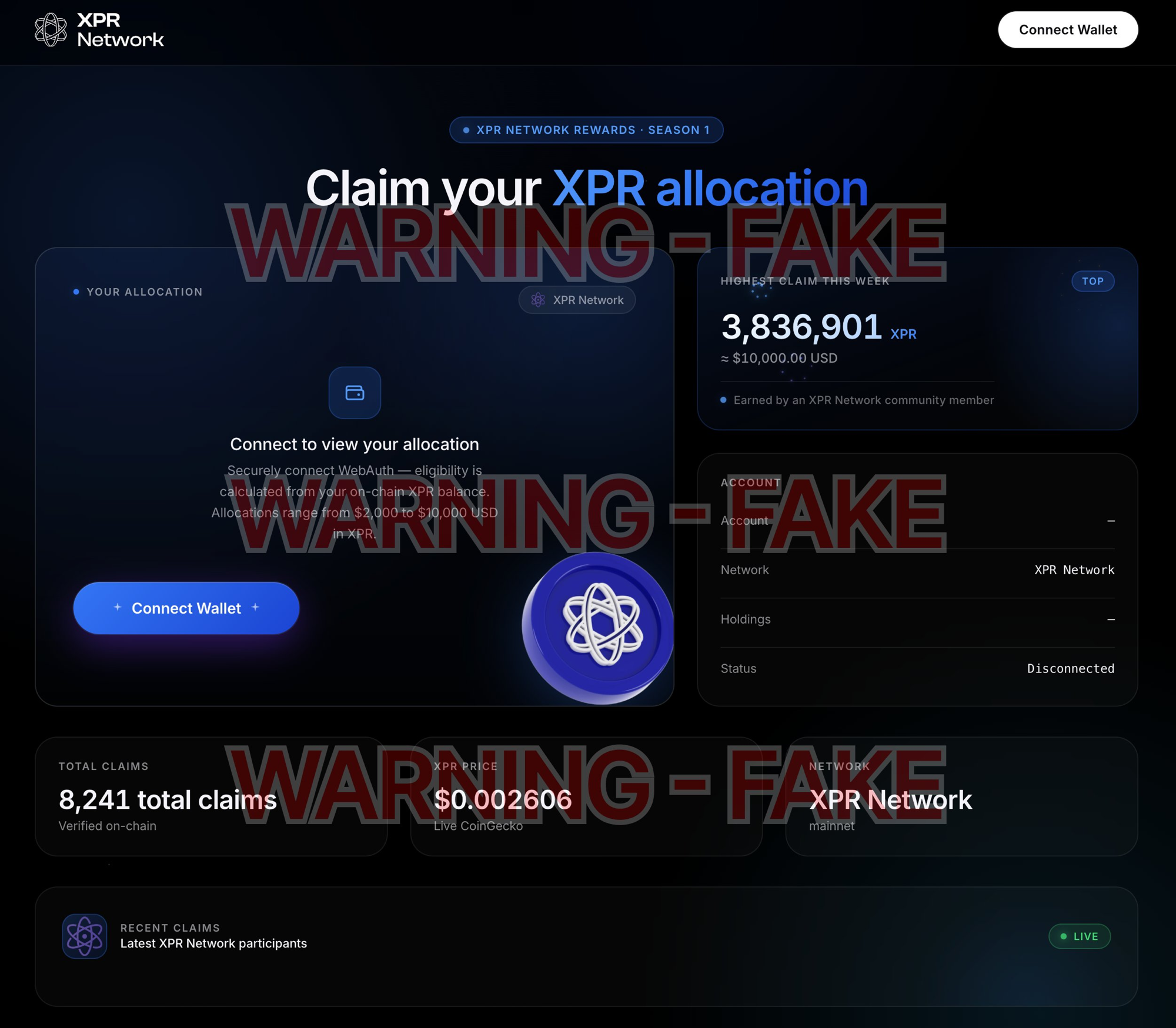
The fake site itself. A page like this — asking you to connect and "claim" an allocation — exists only to make you sign the drainer permission. Close it.
New lure: a QR-code NFT
In September 2026 the same attacker switched delivery methods. Instead of a token with a memo link, they now mint an NFT called "XPR Reward Voucher" directly into wallets. The NFT's image is a QR code, and its description reads "Official XPR Network reward voucher. Scan the QR to open the claim portal." Scanning the QR opens the same drainer — this time hosted on IPFS, so there's no website domain to report or shut down.
Three things to know:
- Holding the NFT is completely harmless. An NFT sitting in your wallet cannot touch your funds. The danger is only if you scan the QR, open the portal, and sign.
- Do not scan the QR code. There is no reward voucher. It leads to the same "claim" page that makes you sign the drainer permission.
- You don't need to remove it to be safe — you can simply ignore it.
"I burned it but it's still in my wallet." The NFT is burnable, and burning works — but many wallets' "hide" or "remove" option doesn't actually call the on-chain burn, so nothing happens and the NFT reappears. If you want it gone for good, open the asset in AtomicHub and use its Burn button. Either way, leaving it alone is safe.
Am I affected?
If you ever connected your wallet to xprdrop.com (or a similar "claim your XPR" site), assume you are affected until you check. You can verify in two ways:
- Use our tool: go to cleanup.protonnz.com and either connect your wallet or type your account name for a read-only audit. It flags any permission controlled by an account that isn't you.
- Check manually: open your account on a block explorer and look at the Keys / Auth tab. If you
see a permission (often called
claim) controlled by another account you don't recognise, that's the drainer.
How to remove it
The cleanest way is to use cleanup.protonnz.com, which bundles every step into a single signed transaction:
- Open cleanup.protonnz.com and connect your WebAuth wallet.
- Review the audit — it shows exactly which permission is malicious and what it's linked to.
- Click to build the cleanup transaction. It shows every action in plain language and raw JSON.
- Sign it. The malicious permission is unlinked and deleted in one go.
Important — if you have staked XPR: the drainer permission is usually linked to token transfers but not to unstaking, so your staked XPR is temporarily out of reach. But the moment it becomes liquid it can be swept. Remove the permission first, then unstake. The tool warns you about this automatically.
You do not need to rotate your keys — no key was stolen. Deleting the permission is the fix.
How to verify this is genuine
This tool asks you to connect a wallet and sign an auth transaction — the same shape as the scam it fixes. So verify it before you use it:
- It is announced from our official X account, @protonnz.
- It is served only from protonnz.com. Never trust a copy on any other domain.
- It is fully open source — you can read every line at github.com/paulgnz/xpr-auth-cleanup.
Stay safe
Legitimate airdrops never ask you to sign an updateauth or linkauth, and never need authority
over your unstaking. When a "claim" wants permission over your account, it's a drainer. When in
doubt, don't sign — and if you've already been caught, run the cleanup and share it with anyone else
who might have been targeted.
This drainer campaign was originally flagged by George Kurupt. ProtonNZ is an XPR Network block producer.